Inventory and warehouse reporting in Business Central gives inventory and business professionals insights and statistics about current and past inventory and warehouse activities.
Explore inventory reports with Report Explorer
To get an overview of the reports that are available for inventory, choose All Reports on your Home page. This action opens the Role Explorer, which is filtered to the features in the Report & Analysis option. Under the Warehouse heading, choose Explore.
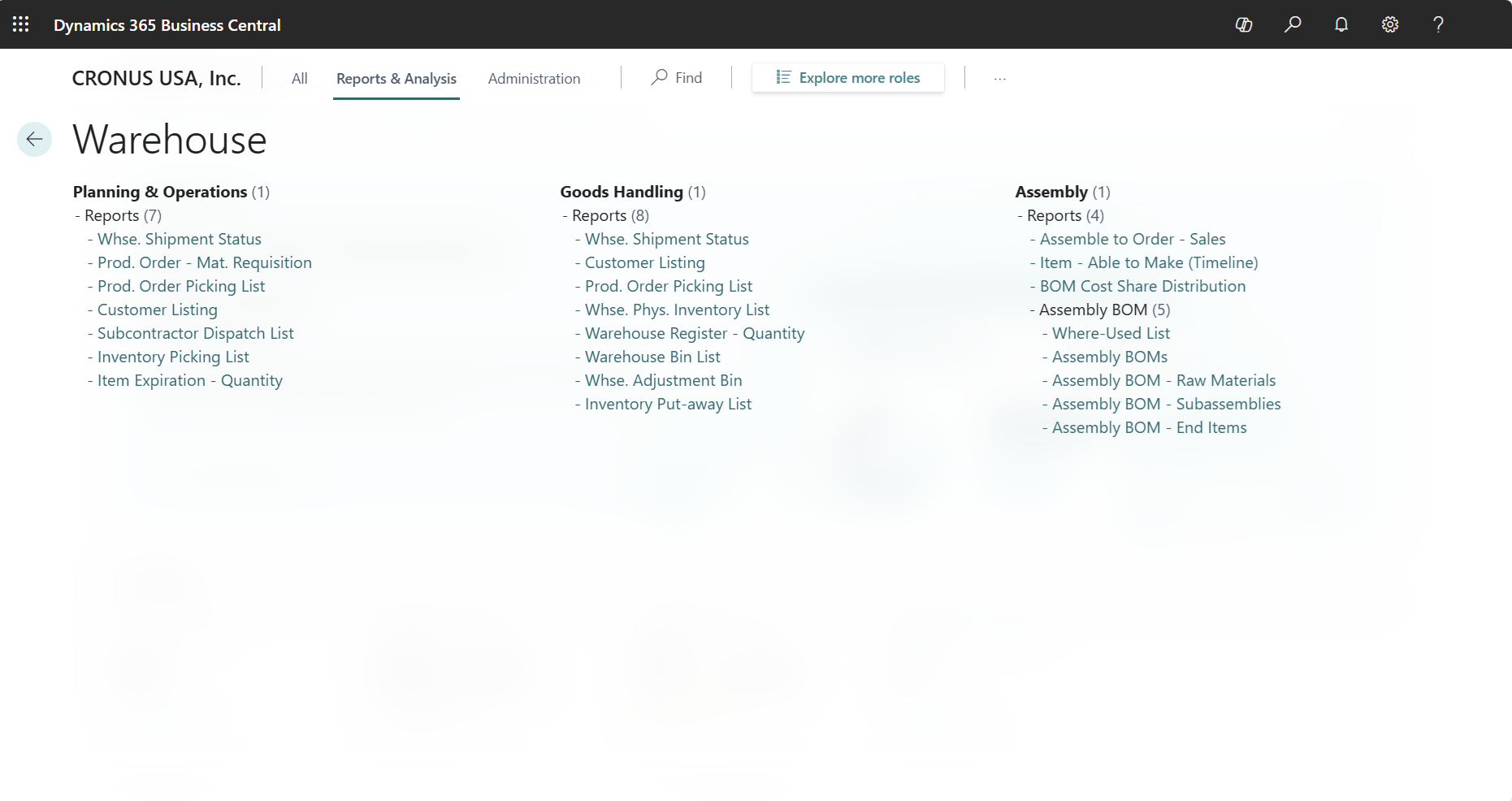
To learn more, go to Finding Reports with the Role Explorer.
Inventory and warehouse report overview
The following table describes some of the key reports in inventory and warehouse management.
| To... | Open in Business Central (CTRL+select) | Learn more | ID |
|---|---|---|---|
| Review inventory movements, such as sales, purchases, and stock transfers for a selected item in a time period to determine the basis of the current quantity in inventory. | Inventory - Transaction Detail | About Inventory - Transaction Detail | 704 |
| Helps you monitor and manage your inventory operations effectively by providing real-time insights into the current state of your inventory. Might allow you to optimize your supply chain processes and reduce cost associated with inventory. | Status | About Status | 706 |
| Get an overview of specific items and stock-keeping units, and their availability. | Inventory Availability Plan | About Inventory - Transaction Detail | 707 |
| Analyze outstanding sales orders to understand your expected sales volume for items. To highlight overdue back orders, compare your overall outstanding shipments with the planned shipment date. | Inventory Order Details | About Inventory Order Details | 708 |
| Analyze outstanding purchase orders to understand the expected purchase volume for items. Compare overall outstanding receipts with the expected receipt date to highlight overdue back orders. | Inventory Purchase Orders | About Inventory Purchase Orders | 709 |
| Review the highest or lowest selling items based on quantity and amount over a selected period to assist with purchase planning. | Inventory Top 10 List | About Inventory Top 10 List | 711 |
| Analyze customer sales per item to understand sales trends, optimize inventory management, and improve marketing efforts. Assess the relationship between discounts, sales amounts, and volume of item sales. | Inventory Customer Sales | About Inventory Customer Sales | 713 |
| Analyze vendor purchases per item to manage inventory procurement and improve supply chain processes. Assess the relationship between discounts, cost amounts, and volume of item purchases. | Inventory Vendor Purchases | About Inventory Vendor Purchases | 714 |
| Analyze and manage your inventory costs and pricing strategies. | Inventory Cost and Price List | About Inventory Cost and Price List | 716 |
| Get an overview of sales orders that you can't fulfill because items are out-of-stock. | Inventory Sales Back Orders | About Inventory Sales Back Orders | 718 |
| Explore sales orders that are covered when you pick items from inventory. | Inventory Picking List | About Inventory Picking List | 813 |
| Reconcile your inventory subledger with inventory accounts in the general ledger at the end of each period. Analyze changes to expected costs posted during the period, and determine the value of on-hand inventory for financial reporting. | Inventory Valuation Note: This report isn't available in the US, Canada, and Mexico. Instead, use the localized version of the Inventory Valuation (10139) report. | About Inventory Valuation | 1001 |
| Helps you manage and track item substitutions in production orders and bills of materials (BOMs). You can specify substitute items to use when the preferred items aren't available, ensuring that production continues smoothly and without delays. | Item Substitutions | About Item Substitutions | 5701 |
| Analyze posted sales or purchase item charges to assess added costs, such as freight and physical handling. | Item Charges - Specification | About Item Charges - Specification | 5806 |
| Review the age of stock in your warehouse by quantity to identify unused or slow moving inventory. | Item Age Composition - Quantity | About Item Age Composition - Quantity | 5807 |
| Review the age of stock in your warehouse by value to identify unused or slow moving inventory. | Item Age Composition - Value | About *Item Age Composition - Value | 5808 |
| Highlight on-hand stock that's expired or will soon. | Item Expiration - Quantity | About Item Expiration - Quantity | 5809 |
| Analyze item entries with dimension details by building groups of dimensions for combinations of dimension values, and view a breakdown of value entries for each group. | Item Dimensions - Detail | About Item Dimensions - Detail | 7150 |
| Analyze item entries with dimension totals by building a groups of dimensions for combinations of dimension values, and view a calculated total based on columns you define. For example, net change, balance at date, and actual vs. budget. | Item Dimensions - Total | About Item Dimensions - Total | 7151 |
| Get an overview of source documents that are open, have items that are shipped, or are due to ship for each location. | Warehouse Shipment Status | About Warehouse Shipment Status | 7313 |
| Get an overview of warehouse bins, their setup, and the quantity of items in them. | Warehouse Bin List | About Warehouse Bin List | 7319 |
| Get an overview of adjustment bin usage (for advanced warehouse scenarios). | Warehouse Adjustment Bin | About Warehouse Adjustment Bin | 7320 |
| Helps you manage inventory levels and ensure that items are available when you need them. | Planning Availability | About Planning Availability | 99001048 |
| Helps you plan future production needs by predicting the demand for items based on historical data and other factors. Use the report to help ensure that production schedules align with anticipated sales and inventory requirements. | Production Forecast | About Production Forecasts | 990003804 |
Analytical tasks
The following articles describe some of the key tasks for analyzing the state of your business:
Print and scan barcodes
Using barcodes can help streamline your inbound, outbound, and internal warehouse processes.
If you install the Business Central mobile app on your iOS or Android mobile device, you can use the device's camera to scan your 1D or 2D barcodes to update information in Business Central.
To learn how to get the Business Central mobile app, go to Getting Business Central on your mobile device.
You can use the Print Label action to print 1D and 2D barcodes from the pages listed in the following table.
| Page | Field values barcodes can include |
|---|---|
| Items, Item Card | Item No., Description, and GTIN |
| Item Reference List, Item Reference | Item No., Description, Unit of Measure, and Reference No. |
| Lot No. Information List, Lot No. Label | Item No., Description, and Lot Number |
| SN Label | No., Description, and Serial Number |
Note
Some printers and barcode/QR code formats require a specific implementation. You might need to upload a different Word template or clone the report to create your own customized version.
Check with your equipment supplier to learn how to print Word documents on your device.
Comments
Post a Comment